Projects Organization Improvements
Users can now copy or move Folders and copy references from one Project to another. Previously, to copy or move references between Projects, users had to export files from one Project and then import into another Project.
Copying References
The updated Assign feature is available in the Reference and Tools Actions main menu area, enabling users to copy references to another Project.
Attachments are included in the copy process. Users may copy references to current Project, which will duplicate selected references with unique Ref IDs.
References can only be copied - they cannot be moved.
This is only available for previously created Projects; a new Project cannot be created during the copy or move process. Only one process is possible at a time.

Moving or Copying Folders
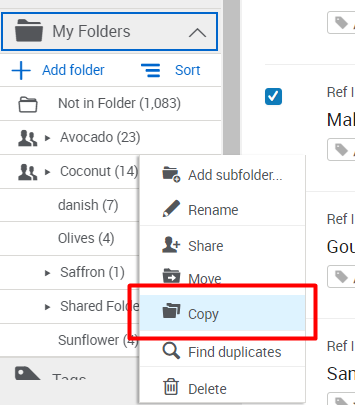
New options to move or copy Folders are available in the more options... dropdown list at Reference Organization (left navigation area) > My Folders.
All references and attachments in Folders and subfolders are included in this process. When a Folder is moved, references are copied into the destination Project and assigned unique Ref IDs. Sharing settings must be removed before moving a Folder. Sharing settings are not copied when a Folder is copied to another Project. References in copied Folders will be created with unique Ref IDs.
Only Folders listed under My Folders may be copied or moved. This process is only available for one parent Folder at a time and includes all subfolders. Only one process is possible at a time.

New Reference Type – Standard
RefWorks now includes a new reference type: Standard. The new reference type appears in citations created with RefWorks Citation Manager (RCM), RCM for Google Docs and Quick Cite. It is also available in the Citation Style Editor.

Author Field Improvements
The names/author fields in the Reference Editor offer more flexibility. Users can now freely edit text, copy and paste and change order and type in non-Latin characters. This change applies to all author related fields: Authors, Editors, Translators, Compilers, Producers, Performers, Conductors, Recipients, Assignees, Publication Editors and Series Editors.

Details Added to Reference Editor and Citation Styles Editor
Users may now use Sub-file and Publisher fields in the Citation Style Editor for reference types where those fields are applicable.


Search Improvements
The Advanced search form now allows users to search for null fields, retain search query text, and to reset or clear a search with a single click.

Output Format Export Options Improvement
Users now have more flexibility with choosing the ID formatting output when exporting references. The ID may be exported as it was previously formatted with the RefWorks default option, as authoryeartitle, or as Ref ID only. Whichever choice is selected will become the default pre-selected choice until the user selects a different option and exports.

New Labels in Subfolders for Sharing in RefWorks, RefWorks Citation Manager (RCM) for Word, and RCM for Google Docs
Users can clearly distinguish which reference(s) are added by themselves, or other users. A notification banner displays when a list of references that contains references added by other users has the same Ref ID as those in your library. Folder icons next to links indicate whether the folder only exists in the owner’s library or is shared with, or by, the owner. This is available in all Views (Normal, Table, Full and Citation).


RefWorks Citation Manager (RCM) for Word References View Improvement
RCM for Word users can now order references in ascending or descending order. This is possible when viewing all references, references in Folders, and search results.

Updated Help Menu
In addition to links to Knowledge Center and Contact Support, users can now access Release Notes, past Announcements, and Idea Exchange.

Bug Fixes
- Admins viewing RefWorks in a non-English language were not able to view the Invite Users button due to incorrect page formatting. This is now fixed.
- The Edit option was not available in the Reference Editor for references in full access shared folders.
- The Reference options Undo, Save, and Cancel in the Reference Editor were obstructed by the lookup suggestions panel when using autofill suggestions.
- The Reference Preview pane options Edit, Duplicate and Close are now frozen to the top of the pane enabling users to take action even if scrolling down to the bottom of the pane.
- The RIS file export format now includes both PMID and PMCID fields.
- For citation styles which use Ibid formatting, edited page numbers were not formatted correctly in documents created in Word, Hangul Word Processor or Google Docs. The formatting is now applied correctly.
- When in Table View, users were not able to drag and drop references into Folders. Users can now drag and drop references from this view.
- When viewing references in a non-English language in Table View, some columns headers were not displayed correctly. This was fixed.
- Fixed a display bug where Tag searches text was truncated.
- Fixed a display bug where Project settings modal text was incorrectly displayed when opened from the Setting page.
- A loading error prevented Quick cite from opening immediately after the user executed a search.
Accessibility Improvements
Added the ability for keyboard only navigation to the following areas:
- Advanced Search form
- Projects tooltip
- Tools page > RefWorks add-ons for your papers section tabs: Microsoft Word, Google Docs, and Hangul
- Account creation:
- Profile creation modals
- Onboarding coach mark tooltips
- Citation Style Editor:
- List of citation styles
- Tooltips in Citation Style Editor
Updated Videos
YouTube channel videos:
RefWorks Administration - Inviting Users
and
RefWorks Administration – Settings Checklist