RefWorks site rebranded to align with Clarivate
To align with our Clarivate brand, the RefWorks logo, typeface and look-and-feel, have been updated. RefWorks related ProQuest branded content is now updated to reflect Clarivate brand.

Previous logos:

Updated logos:


Check out the new logos on our Knowledge Center site.
RefWorks YouTube channel:
Refworks on X @RefWorks:
Plagiarism and AI content checker (Pilot)
In March, RefWorks added a new feature pilot for plagiarism and AI content checker. This initiative is in partnership with Copyleaks.
Every user was granted 40 credits per month by Clarivate. One credit is equivalent to 250 words. Users who use this feature during the pilot retain access to their documents on the Plagiarism and AI content checker page.
This is a limited pilot to explore user engagement and collect feedback. Clarivate will explore this as permanent integration in RefWorks, followed by other products.
RefWorks Citation Manager (RCM) for Word and Google Docs Improvements
New feature for Citation formatting which allows users to switch citations formatting option off to improve performance. Users who are working on large documents may choose to turn automatic Citation formatting: Off to reduce document processing time. Citations will be inserted into document but only formatted once the option is turned On. This feature is only available in RCM for Word.

New options for formatting citations now available to use when citation details other than Page are needed.
The following details are available now: Appendix, Article, Book, Canon, Chapter, Column, Equation, Figure, Folio, Issue/Number, Line, Location, Note, Opus, Paragraph, Part, Rule, Scene, Section, Sub verbo, Table, Verse or Volume. This feature is available in RCM for Word, RCM for Google Docs and RCM for Hangul Word Processor.


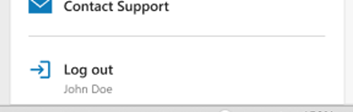
Users may now easily see which account they are logged into in RCM for Word. The account info is listed next to Log out, as it is in RefWorks.

Added and Improved Ref Types
Users can now format their references more easily by using more Ref Types. These are available when creating a new reference manually, during import, in Citation Style Editor and during export.
Ref Types: Computer Program/Software, Figure/Image, Government Document, Lecture/Presentation, Motion Picture/Film, and Video/Streamed


Accessibility Improvements
Screen reader improvements in RefWorks Citation Manager (RCM) for Word on references home page.
Keyboard accessibility improvements on reference home page and bibliography toggle.
Keyboard accessibility improvements on Import page.
Bug Fixes
Some PDFs failed to show a preview in reference Preview pane.
When sharing a folder as public URL, custom fields were missing in reference details.
When viewing admin usage analytics, end date was sometimes excluded from view due to time zone settings and usage graphs formatted metrics with decimal points on some browsers.
In RCM for hangul Word Processor, the narrative citation formatting was not correctly applied in the document.
Erroneous ending period was inserted next to the URL causing the click through link to become non-functional.
Corrected missing page number detail notation in Cite Them Right Harvard 12th citation style in RCM for Word and Google Docs.
Fixed BibTeX and BibLaTeX export formats issues in Book section Ref Type for Book title and Series Title fields.