RefWorks Citation Manager (RCM) for Word Improvements
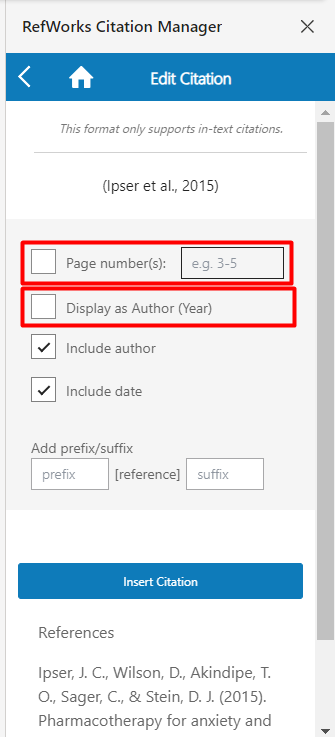
In addition to parenthetical citation formatting, users can now edit citations in integral or narrative citation format: Author (year). Additionally, users can now directly add page numbers to in-text citations. The Page Number(s) field will insert page number in in-text citation for any author-date or footnote citation style. This does not yet apply to superscript styles. Default page number(s) formatting is not affected and follows rules set by the citation style.
The redesigned My References view allows more efficient reference summary with less need for scrolling. When multiple authors are present, a shortened view with ellipses is presented, allowing for the Year to also be listed. Mousing over the ellipses will show all authors.
The Cite and Edit actions are now located on the upper right corner or reference record, thus no longer obstructing reference details. They are still accessible with one click.

Folders in RCM are now displayed in the same order and sorting as in RefWorks, making RCM easier to navigate.


When searching for references, search results now show a label to indicate if a reference is in a folder, allowing for easier choice of which reference to cite.

Users can now change citation style in the main RCM view. This improvement eliminates the need to access the main menu to verify which citation style is applied, or to change the style.

Import Improvements
Users can now easily choose to import more references directly from the Import Process Complete page, eliminating the need to navigate back to import pages.

Export Improvements
Users who are not able to sync with Dropbox may now export all, or selected attachments, in bulk.

Public Sharing Improvements
Recipients of publicly shared folders can now choose from any RefWorks citation style. This does not include user custom styles or Institutional styles.

Users at institutions which use the Link Resolver feature can now share folders via a Public URL with the link resolver included in the references information.

Workflow Improvements
User settings for the sorting, ordering and number of references displayed per page, is retained until the user changes any of these settings. This applies to All references, Last Imported and all Folders as well as search results. The Search Databases and Find Duplicates pages retain the default display views.

Users may now drag/drop references from any page into the Trash, eliminating the need to select references and then click to move them to the Trash.

When viewing references in Table View, the table headers are affixed to the top allowing users to see them regardless of scrolling.

Admin Improvements
The Admin Publications Cited report was updated to include citations used in RefWorks Citation Manager (RCM) for Word and Google Docs, instead of only Write-n-Cite. These are the publications most frequently cited by your users.

Citation Style Added
- Chicago 18th Edition
Accessibility Improvements
- The following improvements were implemented for the Citation Style Editor keyboard navigation:
- Ability to navigate through creating, editing and updating citation styles
- Added access label to search bar
- Updated keyboard navigation order on the Last Imported page
- All modals and dialog boxes now include keyboard focus traps.
- The cookie preferences link is now keyboard accessible.
- The Last Imported link is now keyboard accessible.
Bug Fixes
- Users were not able to create a bibliography from the Search Results when no references were selected.
- The Medium field would change to Volume when changing a Motion Picture ref type to a Video ref type.
- Folders sorting options became misaligned after scrolling on the page.
- In Last Imported view, references were not immediately cleared after clearing “Last imported”.
- Some users were seeing errors when syncing, or were unable to sync newly added attachments, in Dropbox.
- Some users experienced errors in bibliography formatting after a line break was applied in the Reference Editor in Title field.
- RefWorks Citation Manager (RCM) for Word inserted an unnecessary space in front of citations.
- In RCM, the Oxford style citation style can now be set to be formatted for footnotes.